For brands that want to maximize their online presence, a strong Facebook group can be a gold mine.
Not only can you upsell to your customers through a steady drip of informational and promotional content, but you also give them access to a valuable, niche-specific support network. Shared experiences, questions, comments—all of it can drive discussions that lead to growth.
However, what’s worse than not having a group is having a bad one; one filled with disinterested or bad actors who don’t care about personal and professional development but are leeching off of your brand.
That’s where Facebook group membership questions can come in really handy. With a pre-selected list of questions designed to gauge actual interest from a prospective group member, you can eliminate most of the fluff before it ever enters your doors.
Based on our experience, we created this guide to help you write great Facebook group membership questions to make your group time-waster-proof.
Are you ready? Let’s get into it.
Just as the name states, Facebook group membership questions are prompts that a person must answer before being admitted to a Facebook group.
These are different from the community guidelines, which instead outline expectations once a member is already a part of it. Facebook group questions, then, are part of a screening process that happens before a member is approved—usually during the signup process.
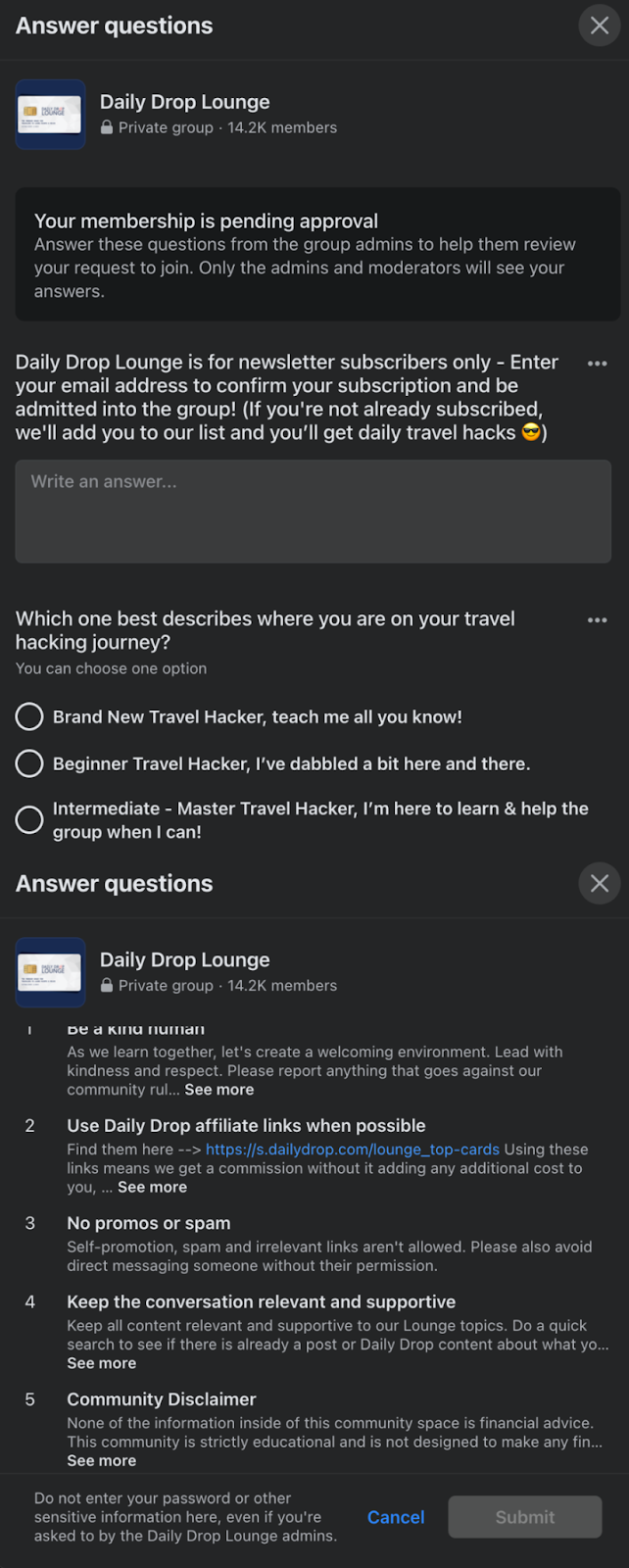
Notice that the example above uses two types of questions: short answers and radio questions. Facebook allows for a third type of Facebook question in addition to these, which is the multiple-choice option. This is perfect if you’re asking a question that requires a single answer, such as how they found your group in the first place.
The types of questions you use for your membership questions don’t matter: the important thing is to ask the questions you need to ask to verify the interest of a potential member.
Savvy Facebook group owners won’t just use these types of questions to verify credentials; they’ll also use them for other purposes, such as lead generation. Think of the verification process as another step in the customer journey and brainstorm ideas on how to use this information.
Here are some great use cases for your Facebook group membership questions:
Chances are that you probably had the option to set up some questions for your Facebook group when you started yours, but if not, the process is super easy.
First, make sure that you’re logged into the correct profile for the group that you want to manage. Click on the profile tab in the top right corner of your Facebook home page and switch if necessary.
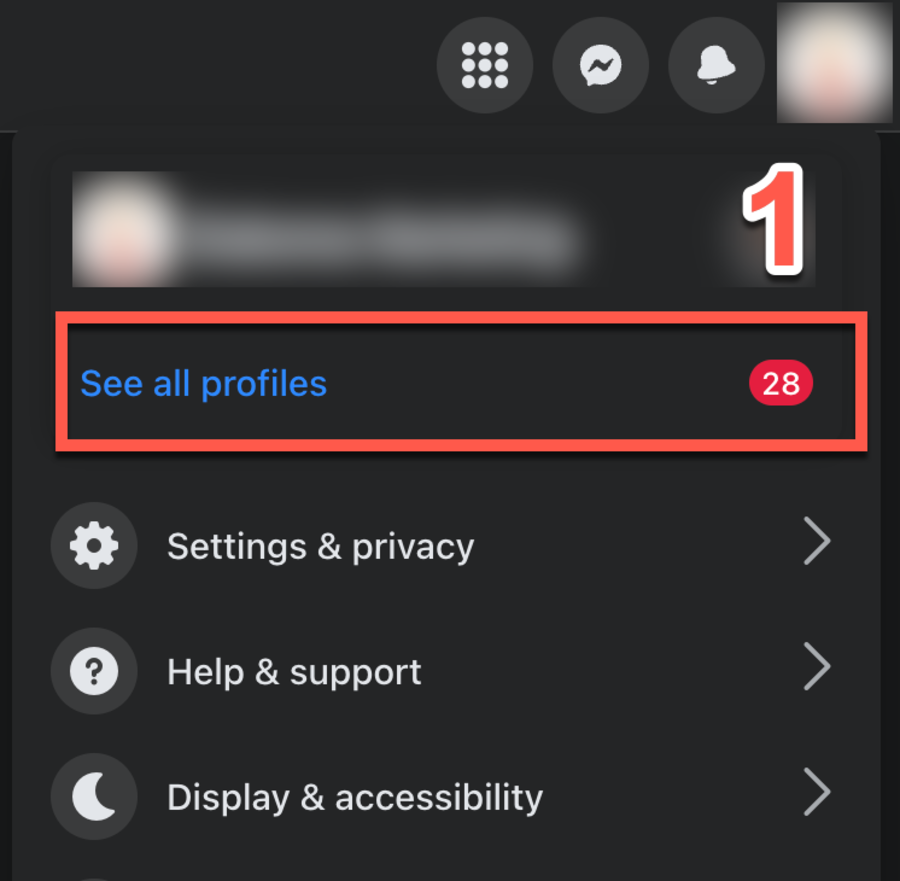
Next, click on “Groups” and then on the group you want to manage. Depending on the permission levels of your profile, you may have several to choose from, so make sure you’re in the right one.
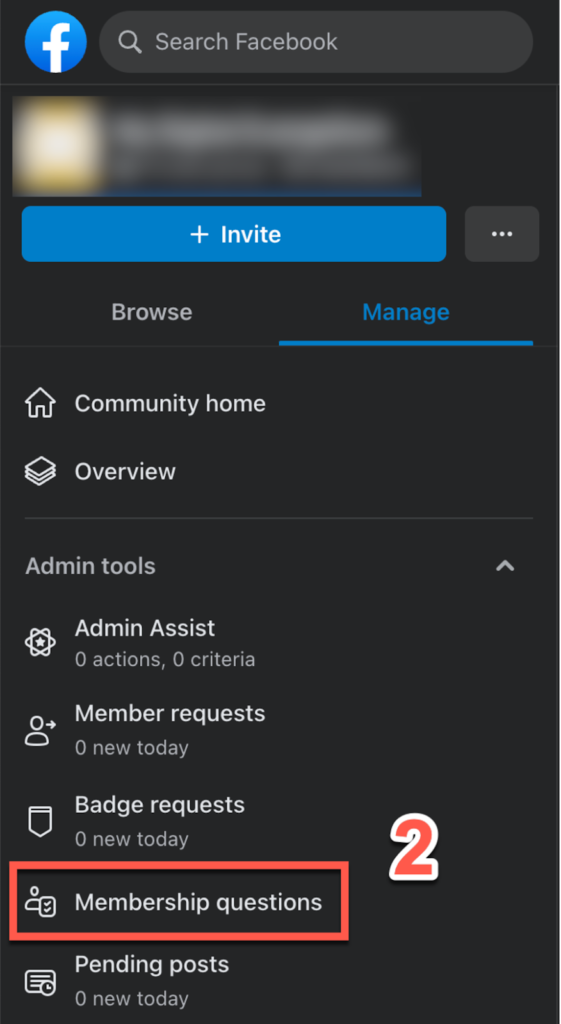
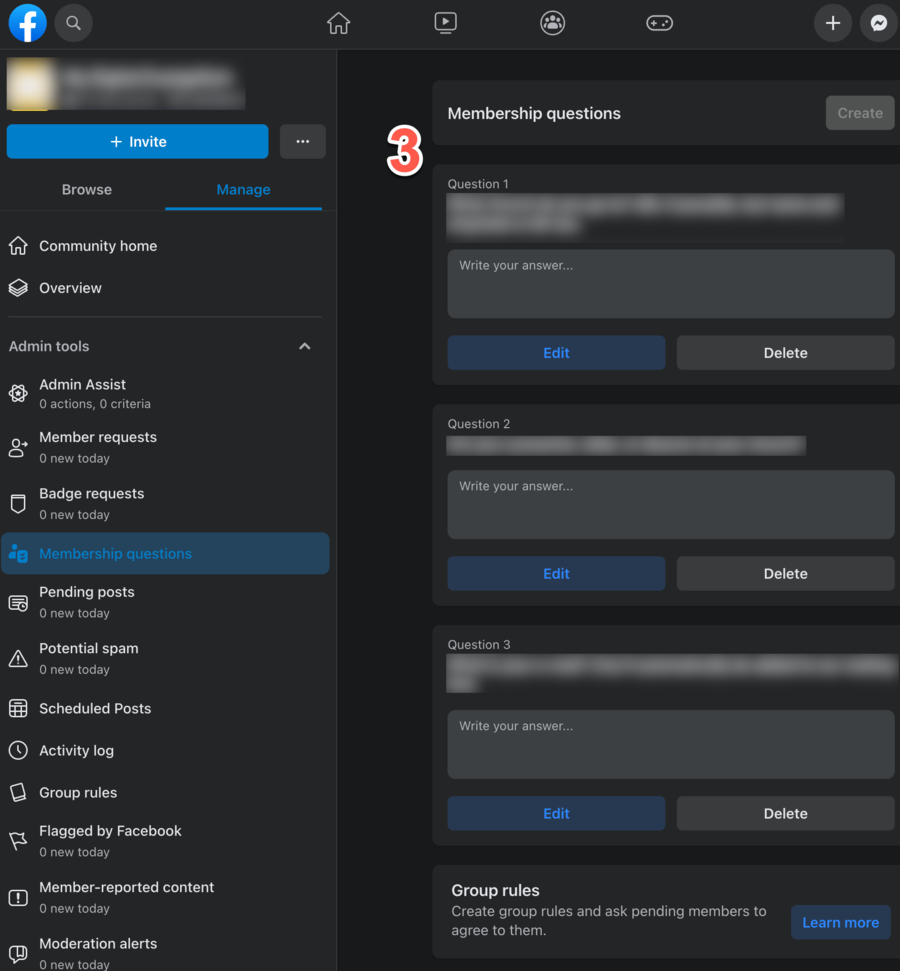
Look on the right side of your group’s home page, which is underneath the admin header. You should see a button that says either “Membership questions” (for private groups) or “Participation questions” (for public groups).
Most groups that you’ll run as an online creator will be closed, so look for the “membership question” option.
As mentioned before, one of the best use cases of this tool is to grow your existing email list. Since users have to answer the questions before they’re admitted to the group, it’s a direct way to generate leads.
And since these leads aren’t cold (they’ve already demonstrated interest in your brand, after all), you can be confident of their high quality.
You’ll have to port those leads over into your email service, but if you’re short on time—or just don’t want the headache—a service like GroupLeads comes in handy.
Unlike most SaaS platforms that require a bulky install and lengthy setup process, GroupLeads utilizes a simple Chrome extension that links your email provider to your Facebook group.
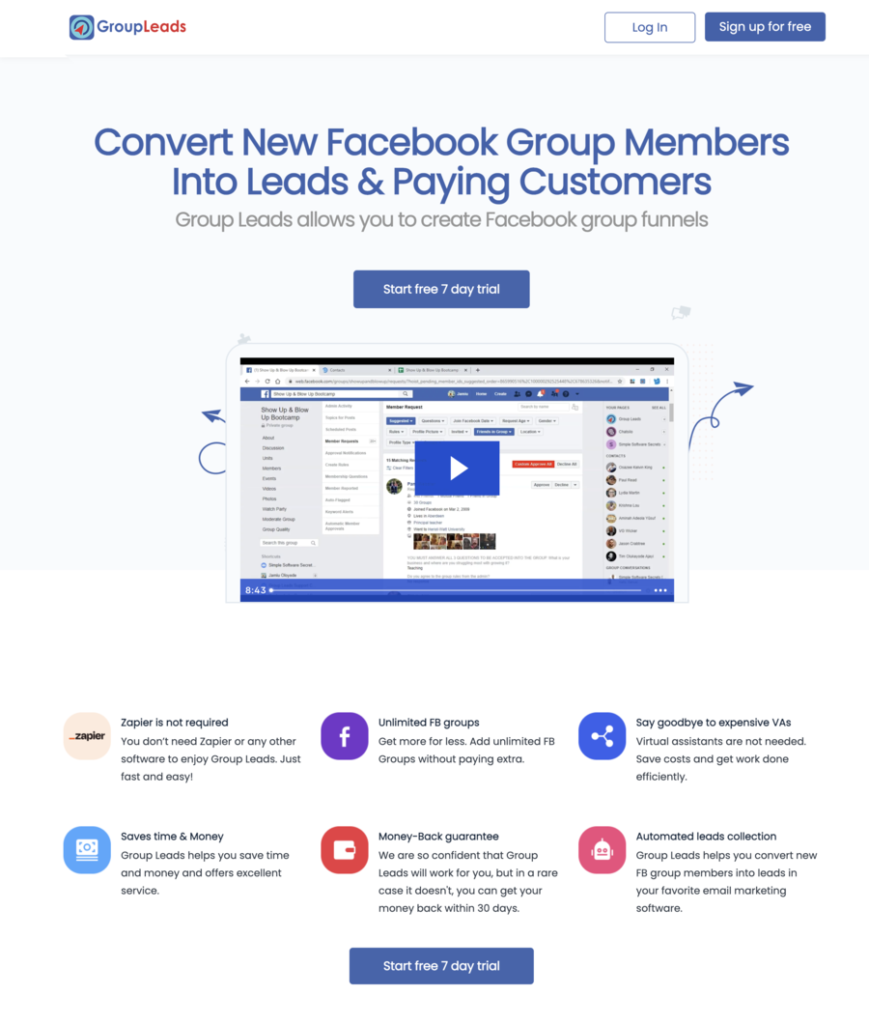
GroupLeads allows for a one-click install, which means that all you need to do is head to your member requests section on your Facebook page, click on “Approve All,” and all your leads—and their data—will be ported over to your email service. Additionally, all their history is stored and can be exported at another moment.
Automation is key if you plan on making money from your Facebook group. If Facebook were ever to go bankrupt or boot you off their platform, you’ll have a hard copy of your member data that you can re-upload to a different platform.
In fact, having your group off of Facebook might be something to consider down the road. While Facebook groups are the most accessible community management platform, it’s certainly not the only ones to choose from. Others have more features and more capabilities for you to maximize your community’s potential and truly make it your own.
Most group owners simply bypass the community questions aspect of their Facebook groups. Or, if they don’t, they think primarily in terms of bot detection and security: keep the bad actors out of the group and only allow entrance to those who will actually contribute.
However, don’t shortchange this process by asking run-of-the-mill questions. Take some time to think of questions that will pull your lead farther down the customer journey and help your brand in the process.
Below are some pro tips to consider when formulating your questions.
Chances are that you have a pretty good idea of who your target audience is—at least in a general sense. Great questions can help you narrow down that understanding to get even more granular with your demographic information.
For instance, if your course is designed for real estate agents, you may have an existing question that asks whether they’re primarily involved in residential or commercial real estate. Both of those groups are similar, but depending on the specific type of group members, you may want to tailor your content.
A Facebook group is not an end unto itself; it’s an opportunity for you as a Facebook group owner to segment your audience and create valuable upsell opportunities for yourself.
While it may not be the strongest screening question, you could ask something like, “Did you know that our brand offers [fill in the blank service or product]?” If they don’t, send them a link with more info.
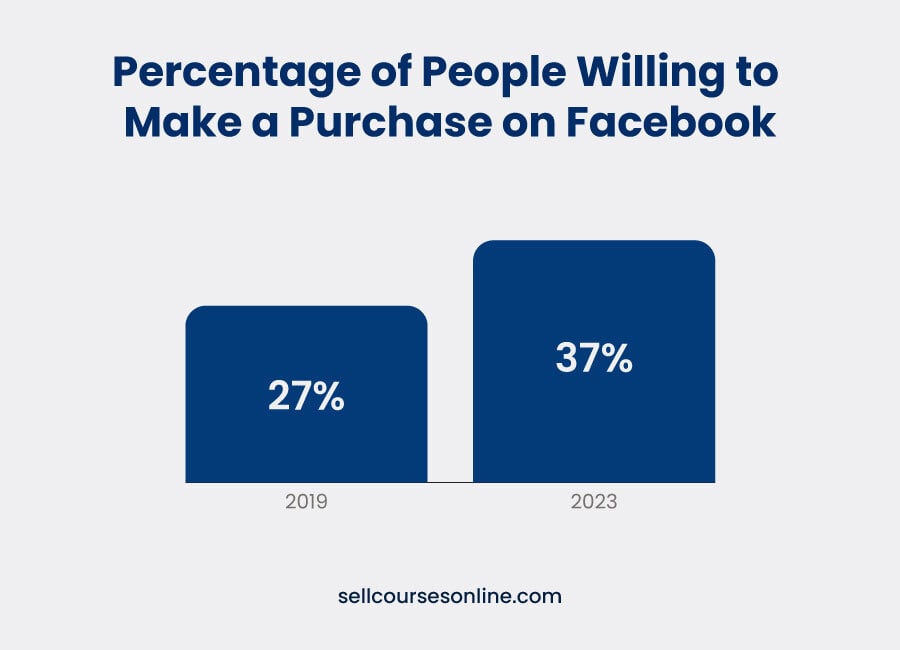
You could also ask potential members if they’re interested in a free trial of your product or service. If they respond yes, provide them with a landing page where they can fill out the appropriate info. People are more inclined to make a purchase on Facebook than they were just a few years ago, so make the most out of this opportunity.
At the very least, you should be collecting emails and then segmenting them based on different criteria (e.g., how they found you, their experience level, their previous purchase history, or something similar).
Don’t just dump those contacts in a master list; put them in the right categories that will allow you to deliver personalized messages later on.
While some of your questions could be somewhat ambiguous, don’t shy away from more direct questions. Ask them to decide between one thing or the other, even if sounds silly.
This accomplishes two objectives. First, it makes it easier for the user to complete the membership questions since they don’t have to think of an answer, and second, it allows you to tailor the potential answers to your liking.
If you run a marketing agency, for example, you may be interested in knowing what kind of traffic sources your audience is most eager to learn about, paid or organic. By asking that question directly, you have a consistent source of answers as to what your audience wants and needs.
Facebook only allows you up to three questions to ask prospective members, so it’s important to make each of them count—especially since one of them will most likely be a lead-generating one.
Resist the urge to ask leading questions that simply build on each other. Ask a question that determines how they found you (“how did you find us?”) with a question that asks about their expectations (“what do you hope you will learn from this group?”).
Facebook is a conversation-centric medium. That means that when people come into your group, they want to engage with the community, not just sit on the sidelines.
The most recent Facebook statistics bear this out. A whopping 98% of group members say that they feel a sense of belonging in their Facebook community and that they lean on other members for emotional support.
This puts Facebook way out in front when it comes to community creation and cultivation. Although platforms like Slack and Discord can foster a sense of community as well, time and again, people come to Facebook to find groups to which they can contribute to.
What does this have to do with your Facebook membership questions? In a word: everything.
A probing question in the application process signals to the group member what the group is all about. A controversial or opinionated question tells them that this group asks the hard questions (which they may or may not appreciate.
Regardless, getting their input on a touchy subject at the outset—even if it’s just a few sentences worth—kickstarts the process of them engaging with these types of questions regularly.
Below are two lists: one that has to do with screening questions for your Facebook group and another that will help with lead generation. Feel free to mix and match them or create your own from the ideas listed below.
Don’t forget to split-test them as well. If you’re not getting the data you want from the questions you ask, switch it up and try some new ones.
The key to effective marketing is squeezing the most out of every opportunity that comes your way, and membership questions for your community are one of them.
With a bit of creativity, you can find the right mix of questions that grows your business and engages your group!
Your turn: what group questions have you seen before that you thought were particularly effective? Leave them in the comments below!
Below are some common questions we get concerning Facebook group membership questions.
Absolutely, and you should. The best way to make sure you keep bots and bad members out of your group is by forcing real responses to real questions.
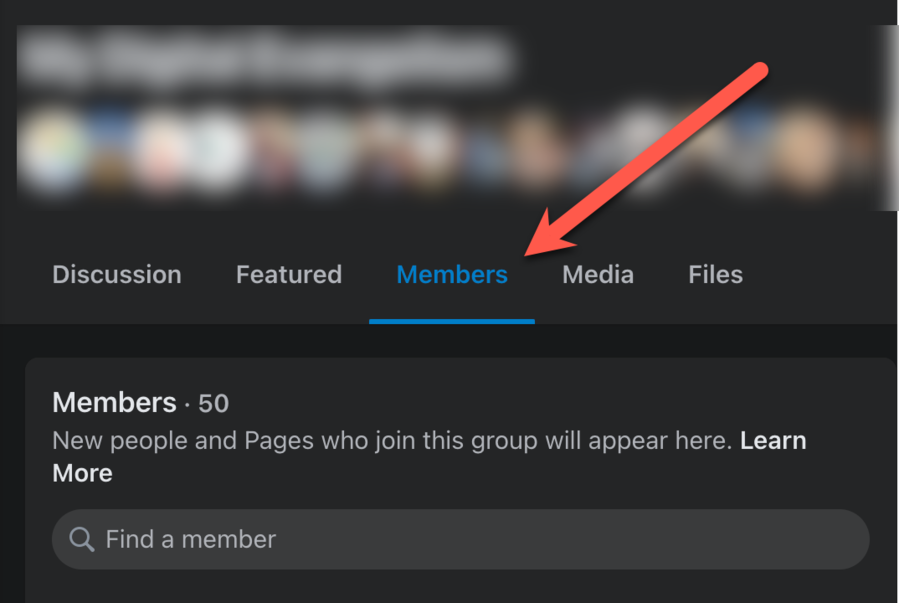
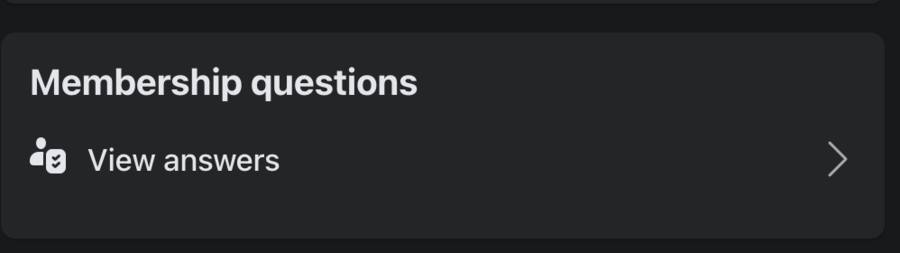
You can find the answers to all of your group questions by clicking on the individual member under the “Members” tab on your group.
To add membership questions to your Facebook group, look under “Admin tools” on your group. You must be an admin of the group to add or edit them.
SellCoursesOnline is supported by its audience. When you purchase through links on our site, we may earn affiliate commissions. However, this doesn’t influence our reviews or product listings. All opinions are based on our tests and personal experience with a product/service.
Copyright © 2024 by SellCoursesOnline

We respect your privacy and will never spam you.