SamCart is well-known for its best-in-class checkout system and powerful sales conversion tools. SamCart Courses is an add-on that offers the basic features for course building, content delivery, and learner engagement.
It can’t replace dedicated course platforms and is recommended for existing SamCart users who need to sell simple video-based courses online.
You may be familiar with SamCart as a robust shopping cart software, but what about the SamCart Courses app? Is SamCart worth buying for this course add-on? Should existing users use it?
To answer these questions, we have thoroughly tested the platform and created an in-depth SamCart Courses review. Here, we’ll cover all the features and discuss the pros and cons of using the platform.
We’ll also compare the software to other popular course creators to help you decide if it’s the right choice for you or not.
Let’s dive in.
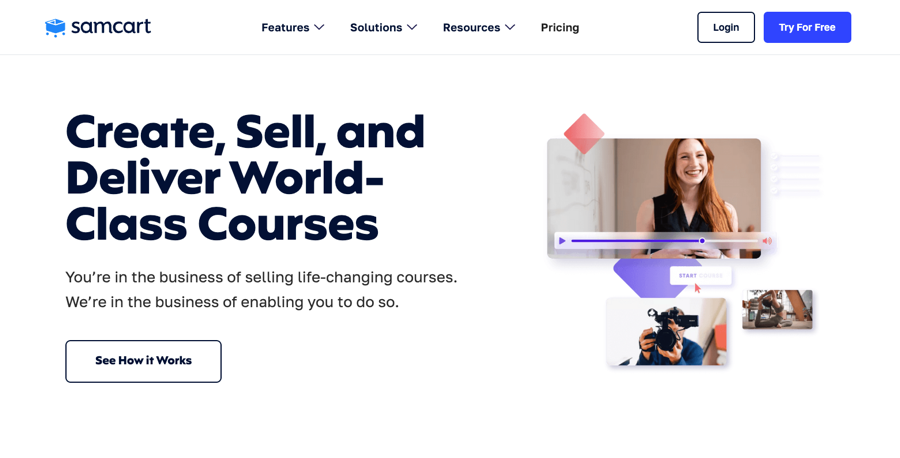
SamCart Courses landing page
Like other hosted platforms, when you use the courses app, you don’t need to worry about updates and maintenance as their team handles it.
It offers a drag-and-drop course builder, flexible lesson structuring, easy-to-create access levels, basic quizzes, worksheets, and course dripping and locking features.
However, what makes SamCart Courses stand out is the possibility of selling online courses using best-in-class sales tools.
Now, let’s explore the features in greater detail.

In this section, we’ll see how SamCart Courses performs in course building and explore the learning and engagement tools it offers. We’ll also look at the content delivery options and their capabilities.
SamCart Courses has an easy-to-use course builder for structuring your course content into units (sections) and lessons. While you add the actual content in lessons, units are for grouping different lessons for organizational purposes.
The course builder is simple to use, and you can easily add units and lessons. Then, you can reorder them by dragging and dropping them.
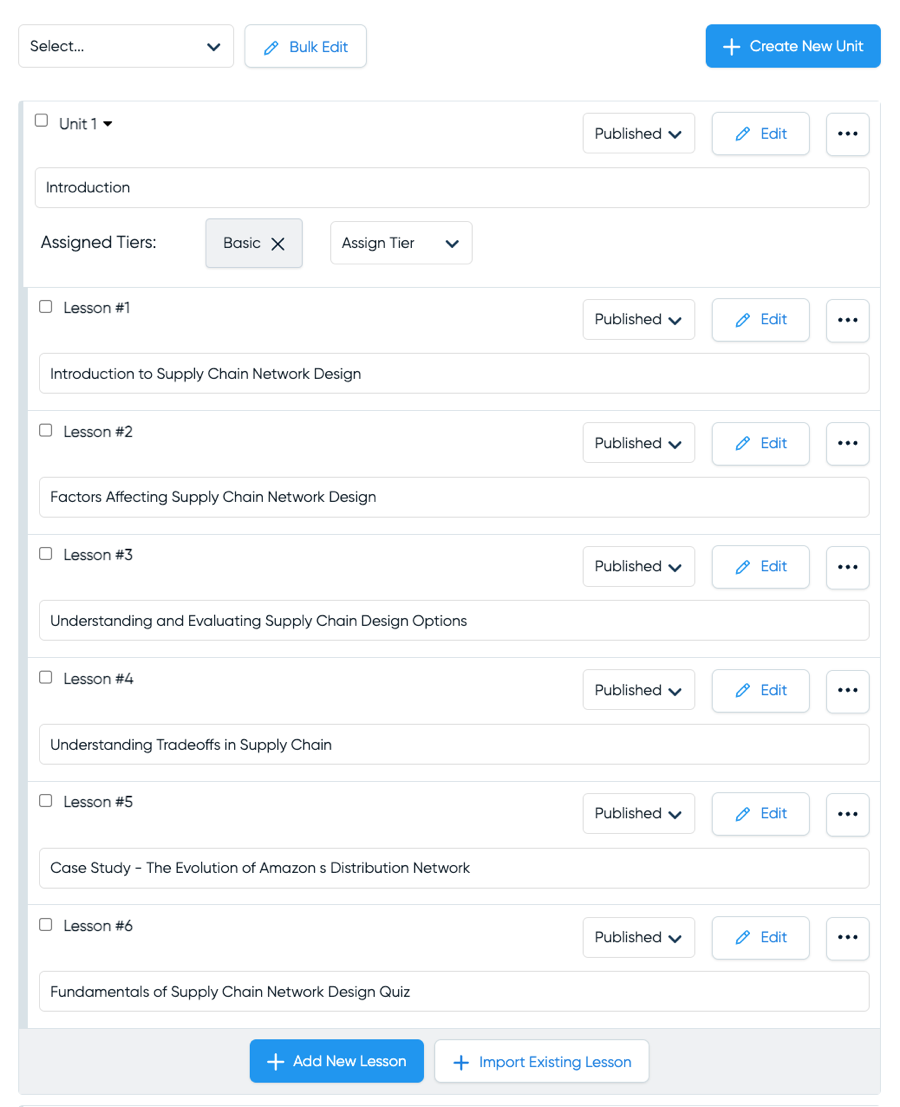
SamCart’s course builder
So, what can you add to these lessons? The lesson editor lets you have videos, images, PDFs, and audio files. It provides native hosting for all content, including videos, eliminating the need for a third-party video hosting platform.
The lesson builder also offers a content editor for adding text content to your lessons and has numerous formatting options.
We love the flexibility the lesson builder offers to add multiple content types in the same lecture. For instance, you can add video + PDF + audio or any combination of content types in any order and even rearrange them.
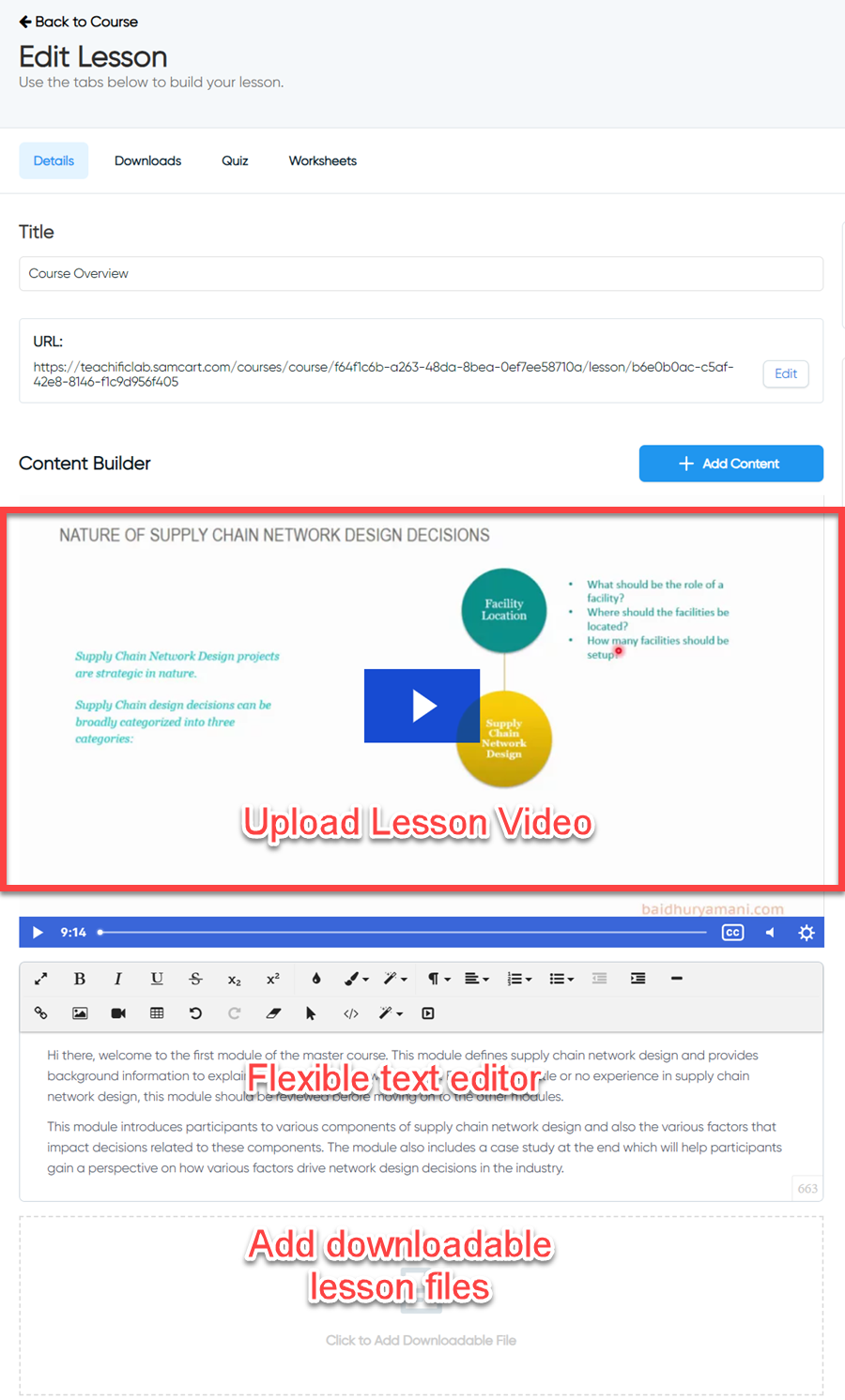
SamCart Courses’ lesson editor
However, you can’t bulk import videos and have to create lessons individually. SamCart also doesn’t support cloud importing, further slowing down the course creation process.
On a different note, one unique feature that SamCart Courses offers is the ability to create different access levels. And you can easily assign your units and lessons to these access levels.
This section will explore SamCart’s learning and engagement tools, starting with quizzes.
The SamCart Courses app provides basic quiz creation tools. The only option is to create multiple-choice questions with one correct answer, and there’s no way to generate multiple-selection questions.
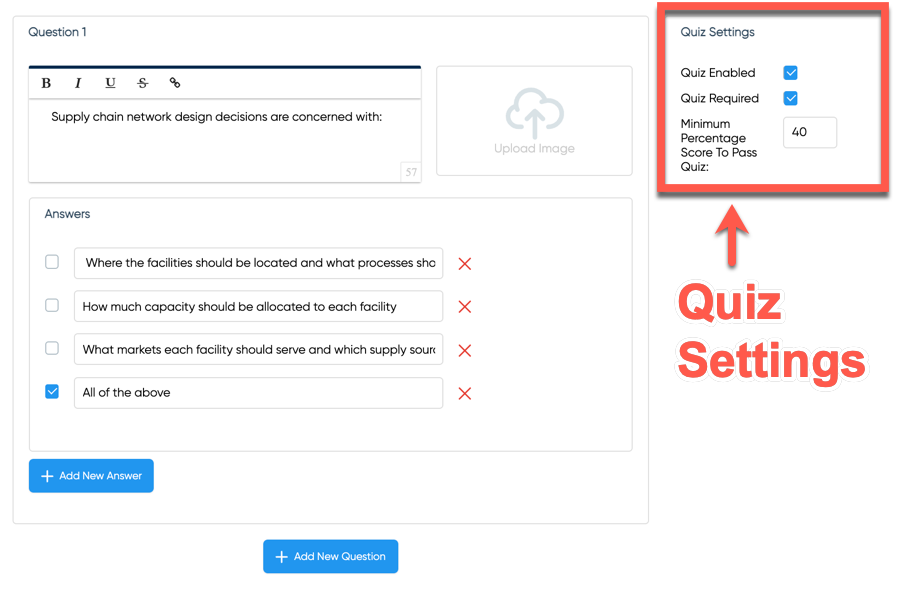
Adding a question in a SamCart quiz
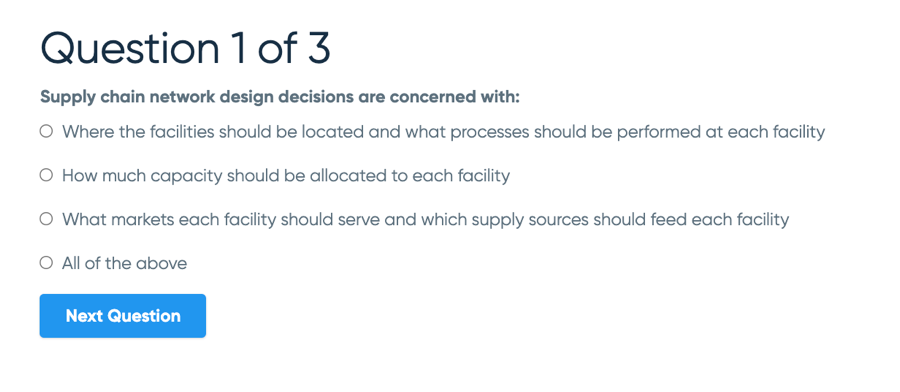
SamCart quiz frontend
Regarding media types, you can add simple text, links, and an image to the question, though there’s no way to add audio or video files to questions or answers.
Finally, you can make a graded quiz by adding a minimum passing percentage.
Speaking of advanced quizzes, features such as randomized question banks, timed quizzes, adding an explanation, and importing questions aren’t available.
SamCart has another assessment feature called Worksheets that allows you to add:
You can also add text, images, audio files, and videos to worksheets to make them more engaging.
Moreover, there’s an option to get an email when a student completes a worksheet.
SamCart’s Worksheets feature is pretty flexible. For example, you can use it to create assignments and evaluate the submissions. Or, you can use it for doing surveys and collecting feedback.
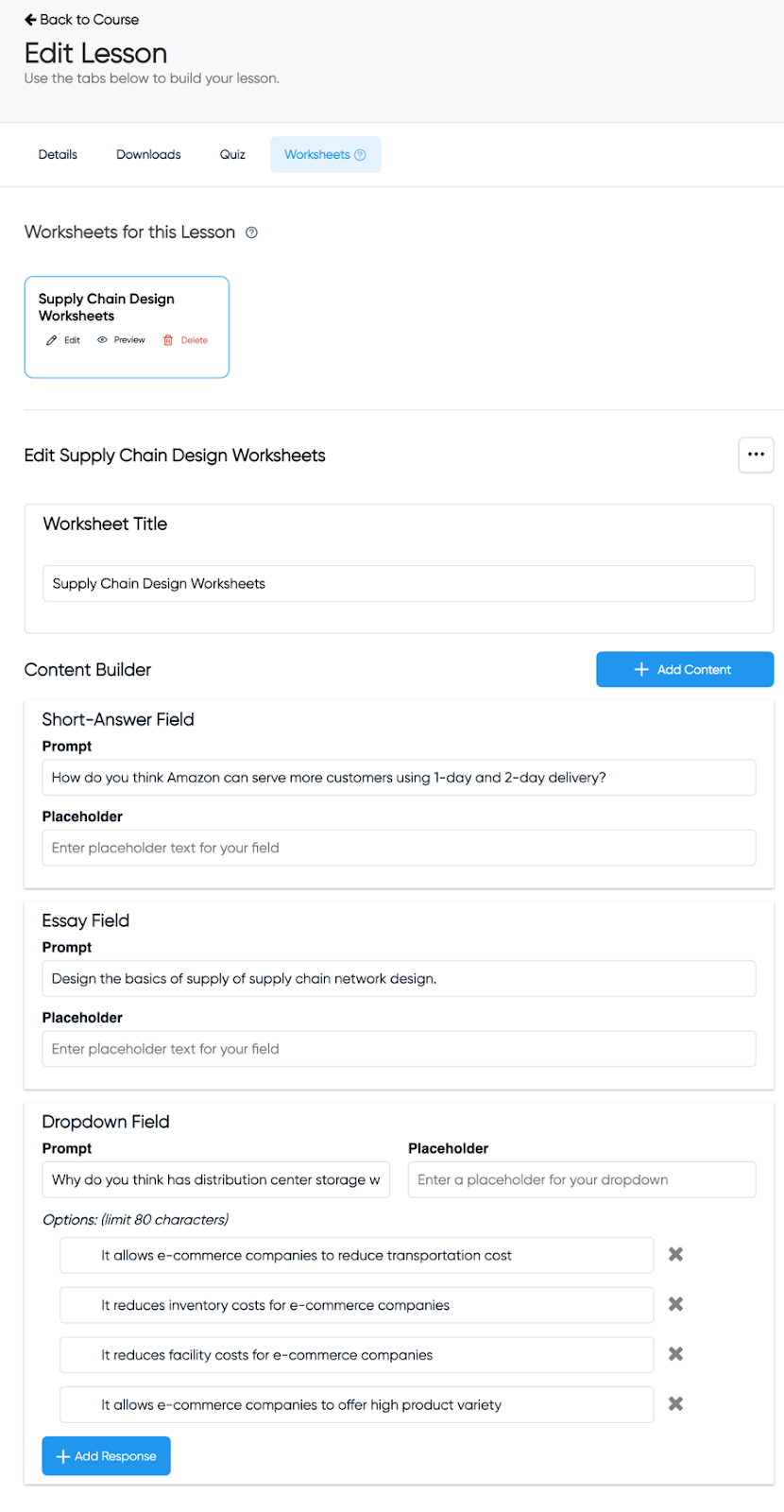
Adding a Worksheet to a SamCart course
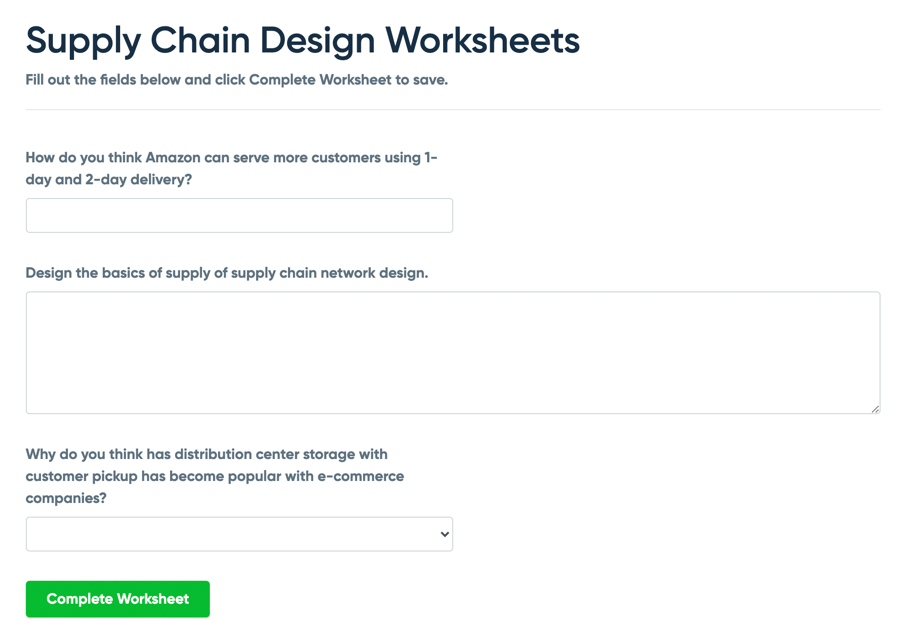
Worksheets frontend
However, worksheets have certain limitations:
When it comes to content dripping and locking options, SamCart Courses allows you to release the entire course in one go or through a drip schedule at a unit or lesson level, meaning that you can choose to release one unit or one lesson at a time.
For every new unit or lesson, you can select the day of the week or the number of days after which it should be released. You can even exempt specific lessons from content dripping and make them available to your students immediately.
However, you don’t get the option to release content on a specific date.
Speaking of content locking, you can select specific units/lessons to make a prerequisite.
There’s also an option to make a quiz compulsory, so your students must complete it before moving forward to other lessons.
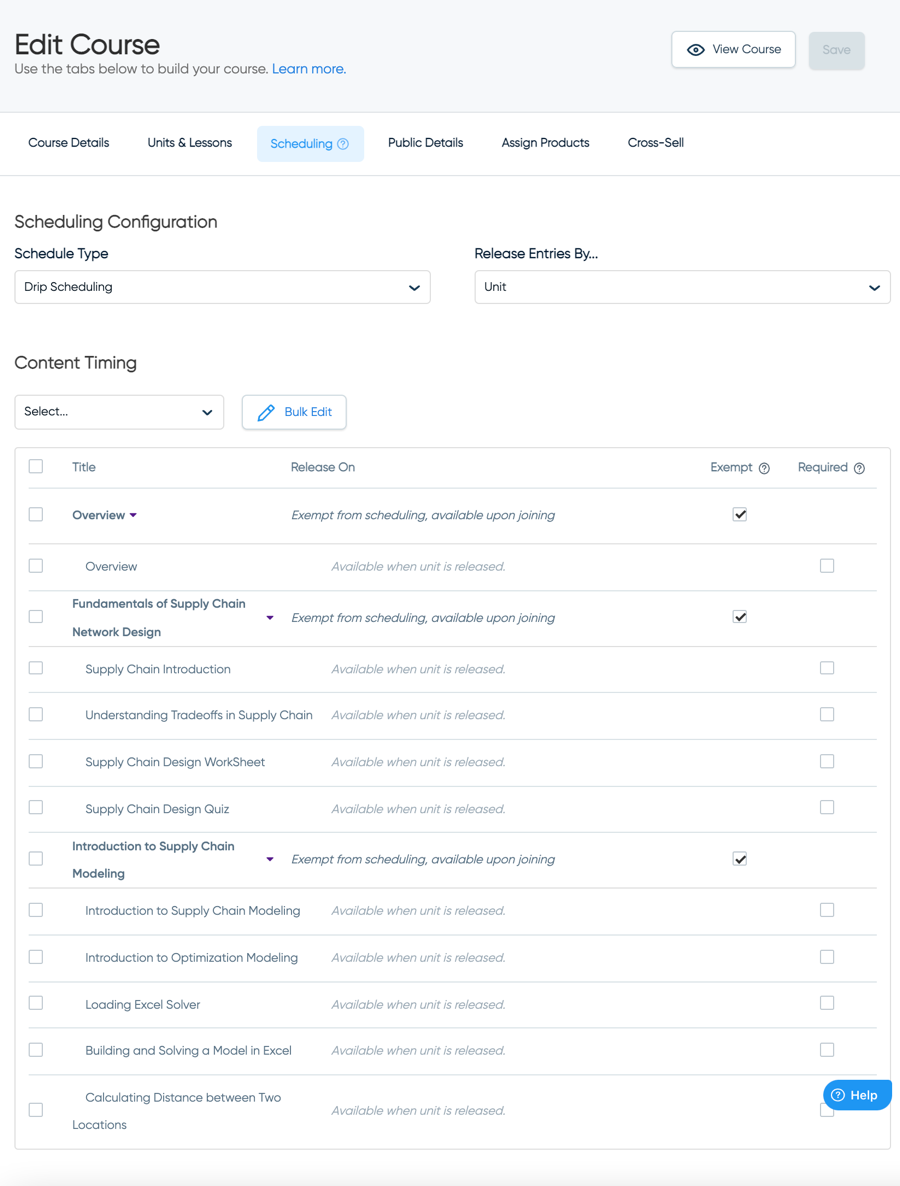
SamCart Courses Dripping and Locking
However, even with these learning and engagement features, SamCart still has a lot missing, such as:
Overall, SamCart offers only the basic learning and engagement tools, while many important ones like certificates and community aren’t available.
Content delivery dramatically impacts the overall user experience, making it one of the most critical aspects of the online course creation process.
In SamCart, your students go through the course content by visiting the curriculum page. They can see their progress here and resume the course from where they left off.
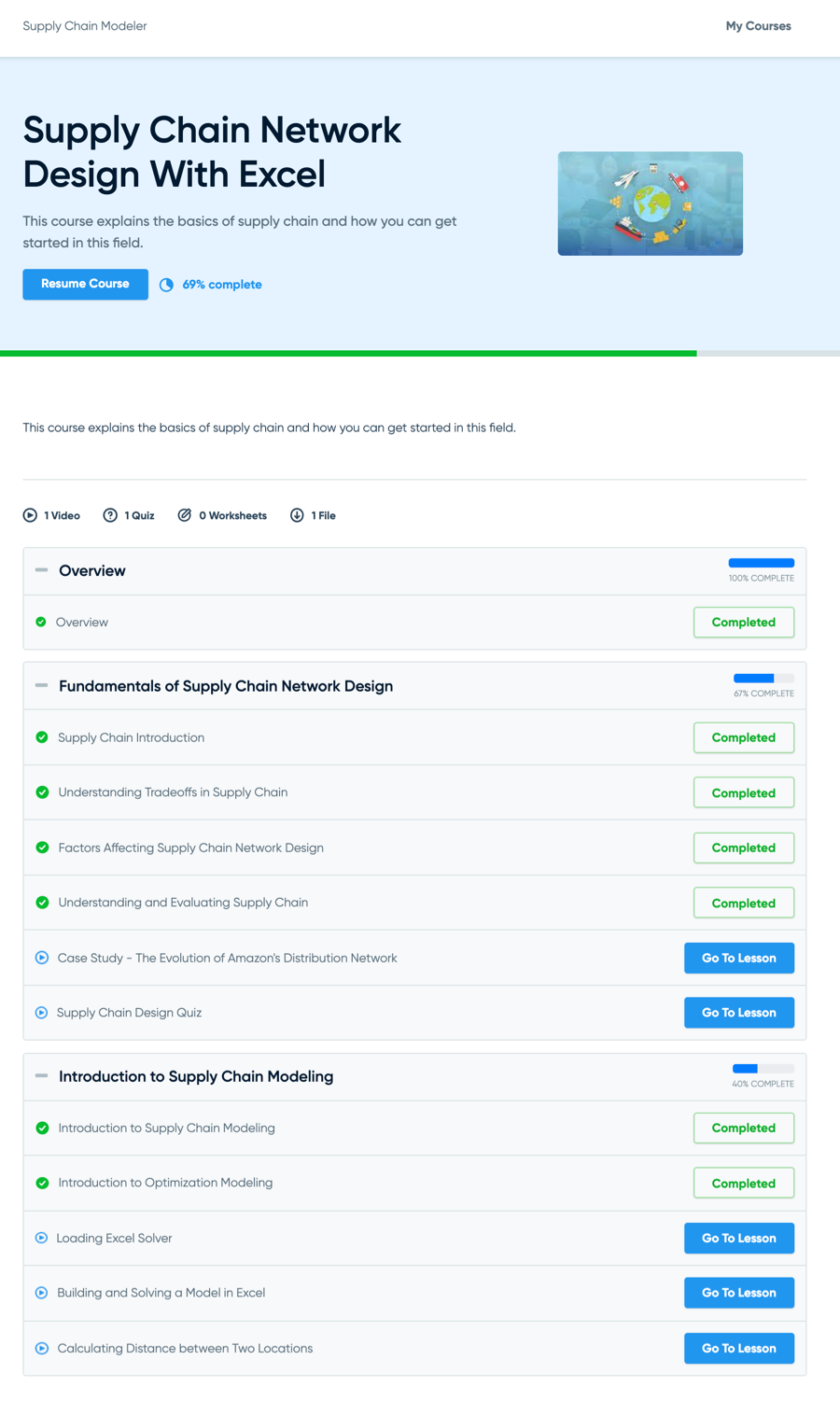
SamCart Courses Curriculum Page
The course content is delivered to students through the native course player. The course player has a conventional layout where the lesson video is present on the right, and the navigation menu is on the left.
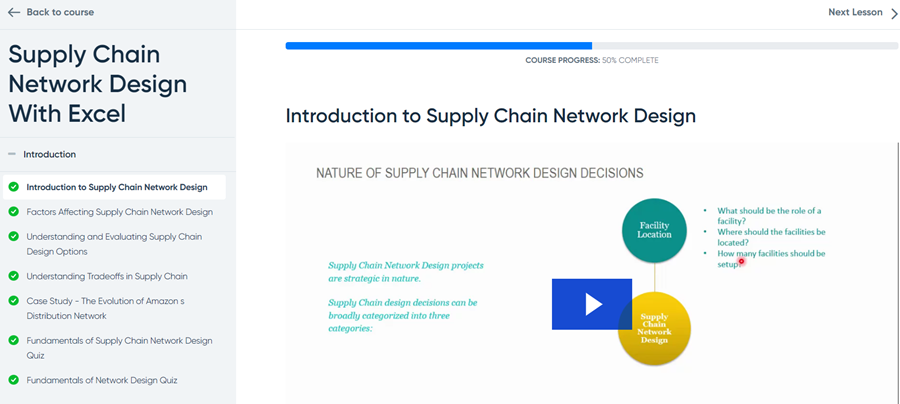
SamCart’s course player
Your students can quickly move between lessons and units using the left navigation menu and the next and previous lesson buttons.
While the layout works fine for delivering the course content, there are a few things that aren’t so great:
Finally, we checked the course player for mobile responsiveness, and it worked well. While there is no iOS/Android mobile app, students can still access the content using mobile browsers.
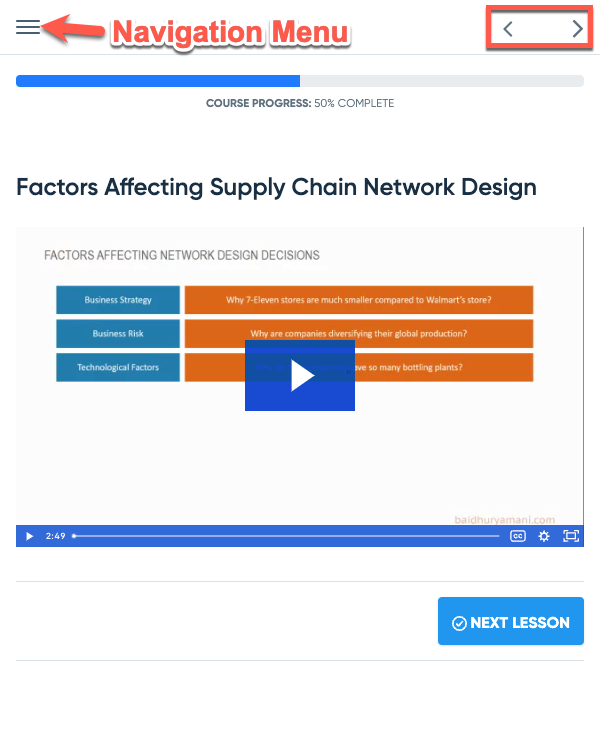
SamCart’s course player is mobile responsive
Overall, course delivery in SamCart is satisfactory, but there’s significant scope for improvement.
Still, if you’re building a simple course and want to leverage the platform’s checkout functionalities, SamCart Courses will do just fine.
SamCart’s pricing starts at $79 per month, and the most popular plan costs $159/month. While they differ in checkout features, the course creation and delivery features are the same for all plans.
The Courses add-on is included in all plans. You can create unlimited courses and unlimited students, and you don’t even have to pay any transaction fees.
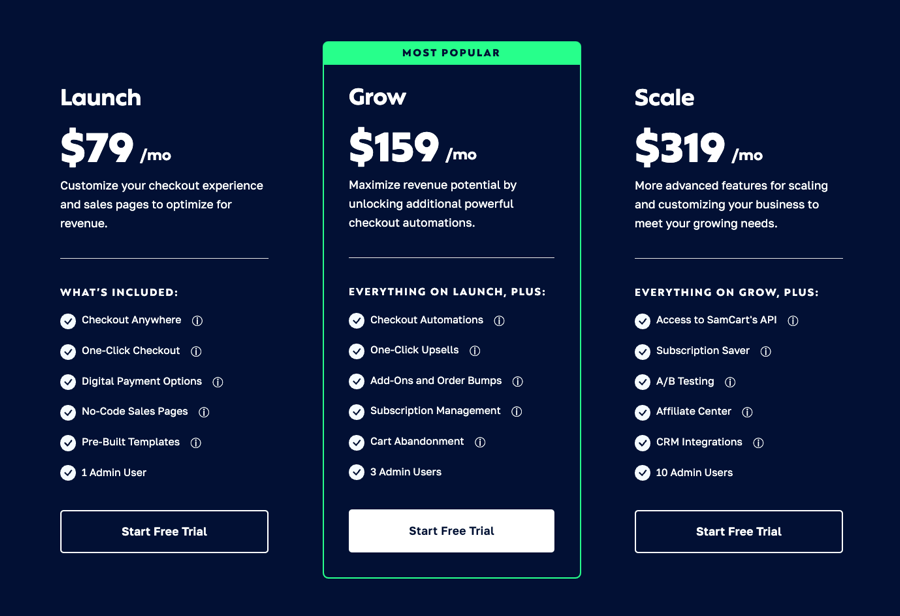
SamCart’s pricing plans
When you compare it to other course platforms, SamCart’s pricing is on the higher side. But for existing SamCart users, there’s no additional cost involved, making it a cost-effective option.
We’ve gone through the features of SamCart Courses in detail. Now, let’s analyze what makes it stand out from the competition.
SamCart’s lesson editor is pretty flexible. It allows you to add videos, text, images, tables, downloadable files, and links. The lesson builder also offers many formatting options.
Moreover, you can add multiple content types to the same lesson and arrange them in any order, making them appear nicely in the course player.
When creating access levels, SamCart offers flexibility and ease that you wouldn’t even find in the top course creation platforms.
With other course apps, you generally bundle different products to create tiers. However, with SamCart’s course creator, you can even group multiple units or lessons within a course to create different tiers.
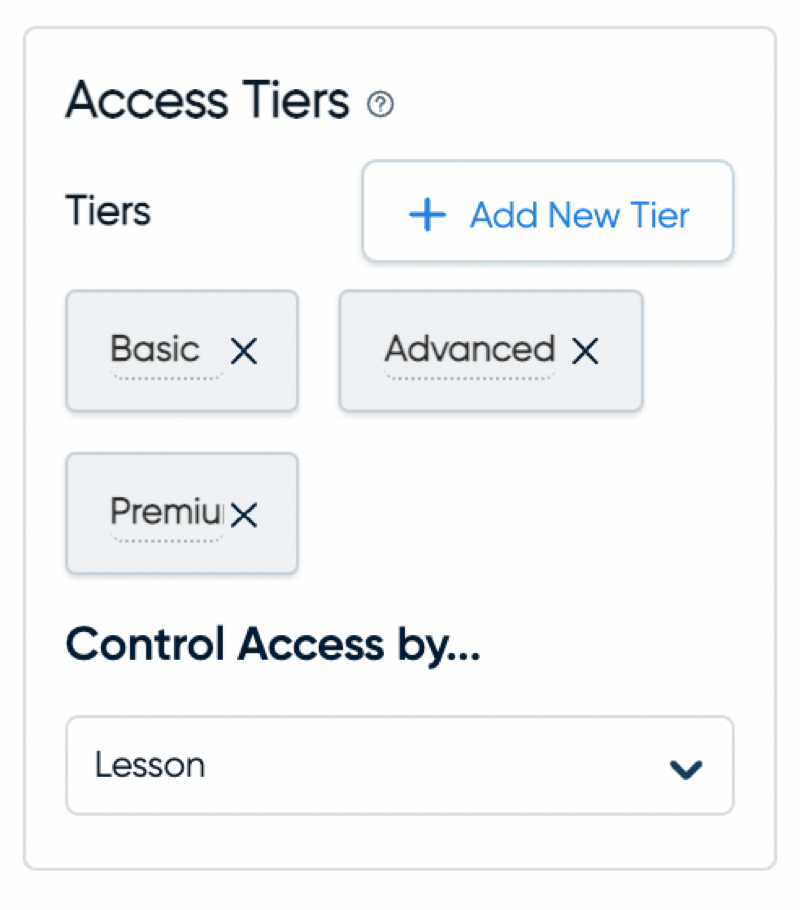
Adding access levels in SamCart Courses
For instance, you can create two tiers for your course: basic and premium. You can include the core lessons in the basic plan, while the advanced lessons can go in the premium plan.
SamCart is primarily a checkout app, and it undoubtedly has the best features.
First, you can add Stripe, PayPal, Google Pay, Apple Pay, and a few more options for payment processing.
For building checkout pages, there are numerous templates available. You can either customize them or create one from scratch.
Moreover, the checkout page builder has all the necessary elements—testimonials, badges, featured boxes, texts, images, and more.
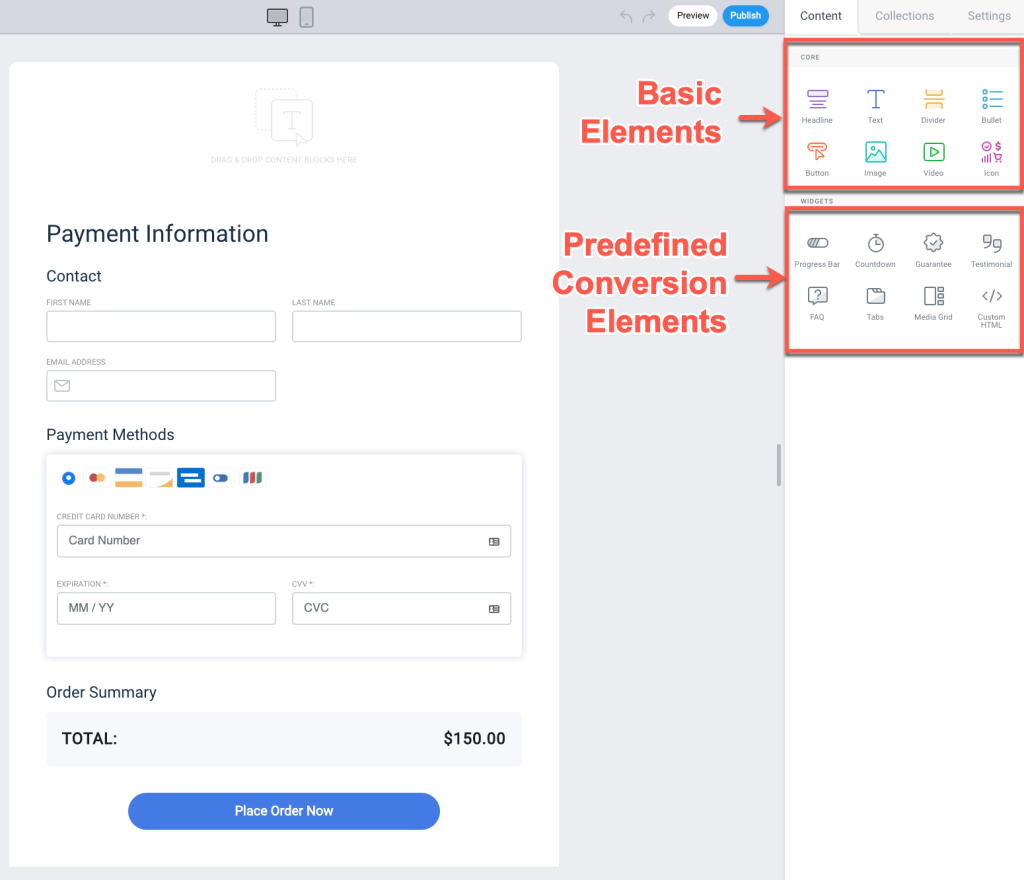
SamCart Checkout Page Builder
Most importantly, SamCart has fantastic tools for boosting conversions and customer value:
SamCart allows you to set triggers and actions by integrating with 20+ third-party apps.
All you need to do is select the integration, add the secret API, and then set the triggers and actions.
More than 15 eCommerce triggers are available, such as order complete, product purchased, and subscription started. You can set different actions for these triggers depending on the third-party apps.
Even in terms of courses, there are four triggers:
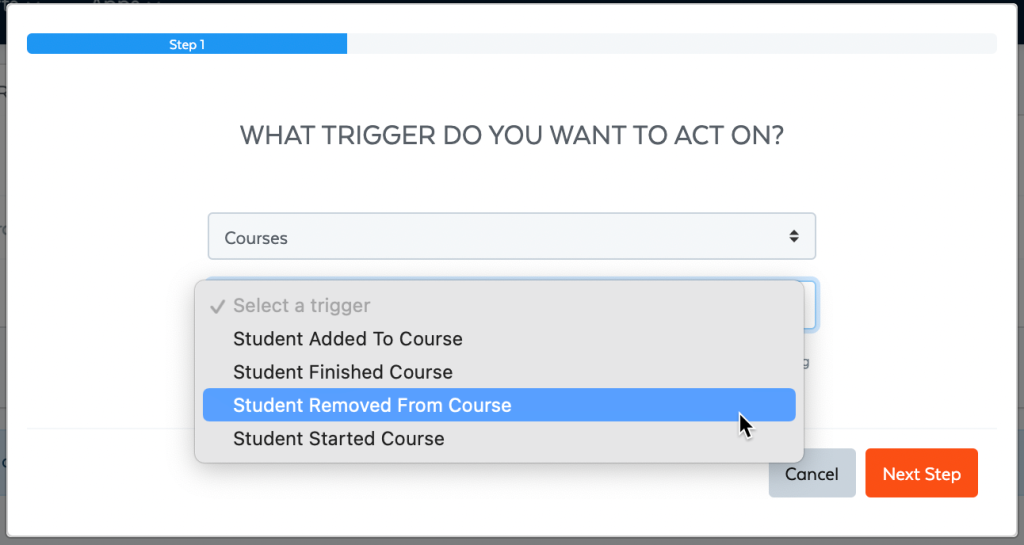
SamCart Courses Triggers
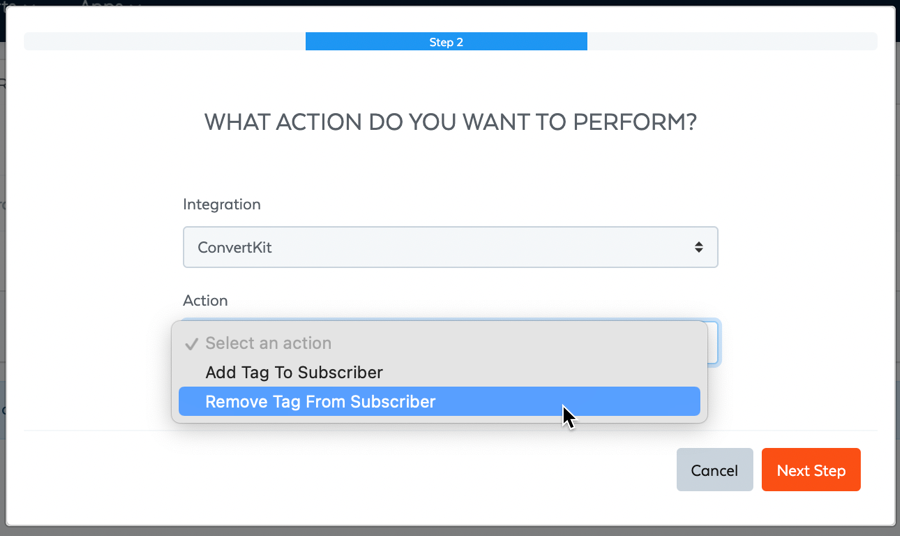
SamCart Triggers for ConvertKit Actions
Choose any of these triggers, set third-party actions, and you are good to go. For instance, you can choose a trigger Student Added To Course, and the action can be Add Tag To Subscriber in ConvertKit, which can then be used to send them an onboarding sequence.
The advantage of this feature is that you don’t need an automation app such as Zapier to create advanced integration with other apps.
SamCart has top-notch tools to run a subscription business.
You can easily create different tiers by adding multiple access levels for all your courses and bundling them to make membership plans. You can even bundle multiple courses together and sell digital downloads as a part of the membership.
Regarding pricing options, there are exclusive features such as custom recurring payment periods, limited period subscriptions, free and paid trials, and initial setup fees.
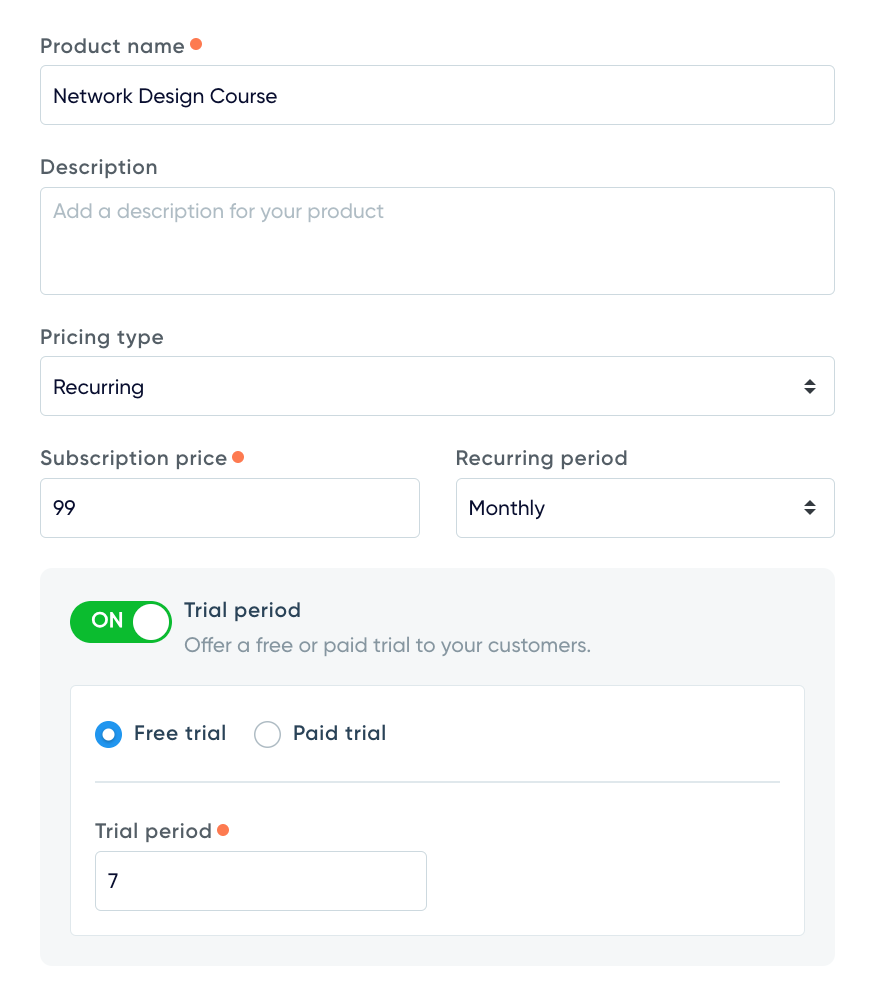
Setting a recurring subscription in SamCart
Besides pricing, there are a few more features that we would like to highlight:
Lastly, SamCart lets you track all the vital subscription metrics, such as current active subscriptions, monthly recurring revenue (MRR), churn rate, new trials, cancellations, and at-risk subscriptions.
SamCart Courses lacks some important features that can impact your online course business. In this section, we’re going to cover all those aspects.
While SamCart Courses offers quizzes, worksheets, and course dripping, they all have limitations. For instance, you can only create basic multiple-choice quizzes and don’t get any advanced features.
Besides, you can’t provide students with a certificate of completion after completing a course.
Moreover, you don’t get any features for community building or facilitating discussions. And live classes and one-on-one coaching features are missing, too. As you can see, there’s no way to interact with students.
While SamCart has a checkout page builder, it doesn’t have a website builder. There are no website themes or the ability to create full-fledged sales pages.
So, if you want to build a full-fledged course website with a homepage, blog, etc., that’s not possible with SamCart. In this case, you must use WordPress or another platform to host your website.
SamCart offers great flexibility when creating a purchase flow. However, you’ll find the linking process tough to understand.
If you create multiple access levels, you’ll need different products for each, and then you’ll have to assign these products back to every access level. You’ll also need to add a purchase button link that will lead to checkout.
The whole process is complicated, making it challenging to create the flow properly the first time. However, it should be fine once you get familiar with it.
Though SamCart has powerful sales reporting tools, it doesn’t provide any course insights. You’ll be disappointed if you want to know about metrics such as completion rate, student progress, and quiz performance.
All top course platforms offer these reporting tools, allowing you to make data-based course decisions. Unfortunately, that’s not possible with SamCart.
Moreover, no video analytics is available, so you can’t get information about video views and engagement.
Before providing the final verdict, let’s see where SamCart Courses stands against online course builders.
One of the best platforms that course creators choose is Thinkific. It is a standalone course platform primarily focusing on course creation and delivery.
Compared to SamCart courses, Thinkific offers many more course-related features, such as advanced quizzes, certificates, live classes, communities, and mobile apps. It also includes a website builder and dozens of third-party apps to extend your website functionality.
So, if you’re looking for a complete course-building platform, Thinkific is the way to go. However, its checkout builder isn’t as powerful, which is why many creators use Thinkific and SamCart together.
Another popular course platform is Kajabi. It is an all-in-one online course platform that offers features to manage all aspects of your knowledge business.
With Kajabi, you get multiple course player designs, quizzes and assignments, mobile apps, communities and coaching, a powerful website builder, optimized checkout, a funnel builder, and an email marketing tool.
Again, Kajabi is a stronger option for course creators and is recommended if you want to run your entire business from a single place.
This SamCart Courses review discussed all of the platform’s course creation features. Moreover, we explored the tools that make the course app stand out and others that aren’t so good.
Overall, the course app lacks some pretty important features and can’t replace a dedicated online course platform yet. But if you’re an existing SamCart user and want to create simple online courses, the Courses add-on should work well for you.
If you want to try SamCart Courses, you can start a free trial by clicking below.
We hope you liked this SamCart Courses review and that it helped you decide if it’s the right option for you. If you have any queries regarding the platform, drop them in the comments section below.
An online community platform is a software that lets you create a website where people with common interests can connect and interact. The platform provides the infrastructure for members to communicate and collaborate with each other, share content, and participate in activities and events.
Choosing the right platform for your community depends on the type of community you’re building, the features and functionality you need, your technical know-how, and your budget. However, a good community builder should offer the essential tools for content creation, community organization, member management, moderation, etc.
Circle is the best all-around community platform that works well for creators as well as brands. In addition, Mighty Networks and BuddyBoss are also great options for creators.
BuddyBoss is the best community plugin for WordPress users, as it is the only robust WordPress-based option that offers a complete suite of community-building features. It also integrates with other popular plugins like LearnDash and Gamipress.
The best way to get your community app is to subscribe to a community builder that lets you create branded apps. There are a few providers out there, like Mighty Networks, BuddyBoss, and Disciple, that provide this service.
There are many ways to build community engagement, but some of the most effective methods include creating valuable content, hosting events and meetups, community gamification, etc.

Hey there! I'm Baidhurya, the brains behind SellCoursesOnline. I used to run a digital agency, where I helped course businesses launch their eLearning platforms. I also led the tech and marketing teams at StationX, helping it grow to 500K+ students. In addition, I created the popular supply chain network design course. With 8+ years of experience, I'm here to share my expertise and insights on course creation and platforms with you.
SellCoursesOnline is supported by its audience. When you purchase through links on our site, we may earn affiliate commissions. However, this doesn’t influence our reviews or product listings. All opinions are based on our tests and personal experience with a product/service.
Copyright © 2024 by SellCoursesOnline
Hey there! I’m Baidhurya, the brains behind SellCoursesOnline. I used to run a digital agency, where I helped course businesses launch their eLearning platforms. I also led the tech and marketing teams at StationX, helping it grow to 500K+ students. In addition, I created the popular supply chain network design course. With 8+ years of experience, I’m here to share my expertise and insights on course creation and platforms with you.

We respect your privacy and will never spam you.