Thinkific is a top platform that provides the necessary technology and infrastructure for hosting and delivering your online courses, saving you time, money, and effort in building a course platform from scratch.
It’s smart to use Thinkific and white-label it instead of building a custom platform. But why?
Here are the primary benefits of white-labeling your course platform:
Now that we’ve discussed the whys of white-labeling, let’s talk about what white-label options are available in Thinkific and how you can use them.
When you create a course website on Thinkific, it will be on the platform’s subdomain. So, your site’s URL on Thinkific would look like this: sellcoursesonline.thinkific.com.
Not to worry, though. Thinkific allows you to change that URL and use a custom one instead. That way, your entire website will be on your own custom domain.
And if you’re wondering how you can benefit from a custom domain, here are a few ways:
We want to emphasize that a custom domain is the most important white-labeling option, and we recommend every serious course creator use it.
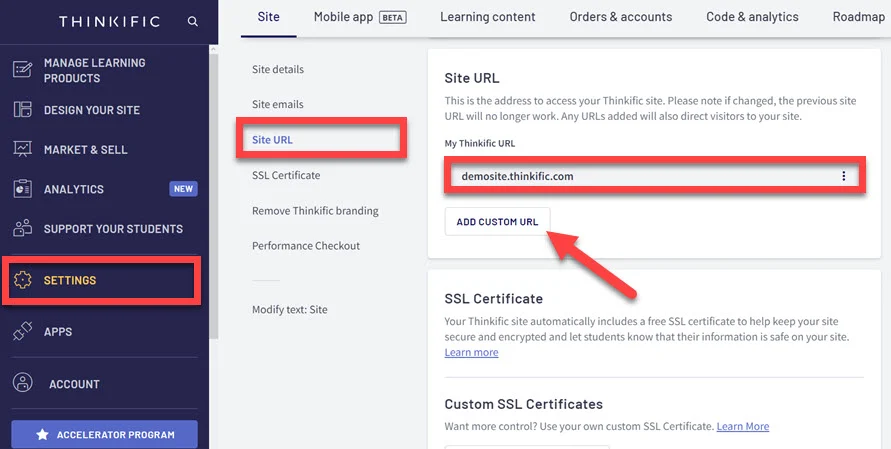
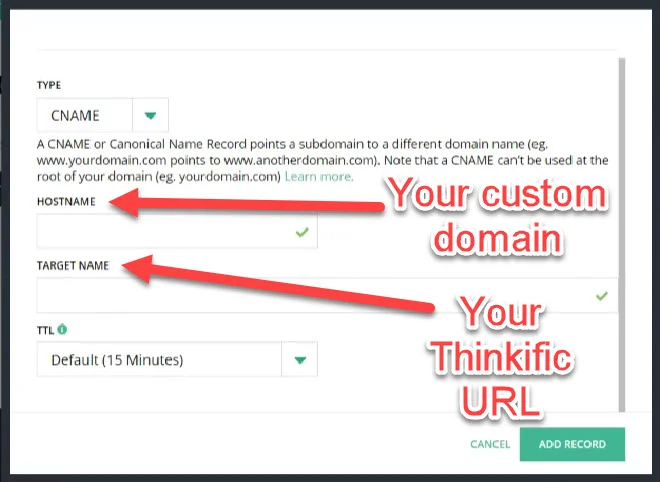
If you decide to use a custom domain on Thinkific, here’s how you can set it up.
From your account dashboard’s left-side menu, select Settings, and in the Site tab, click on Site URL.
Before you decide to remove Thinkific’s branding, you should know where it’s shown by default. You’ll find the platform’s Teach Online With Thinkific and Powered By Thinkific tags in the following areas of your website:
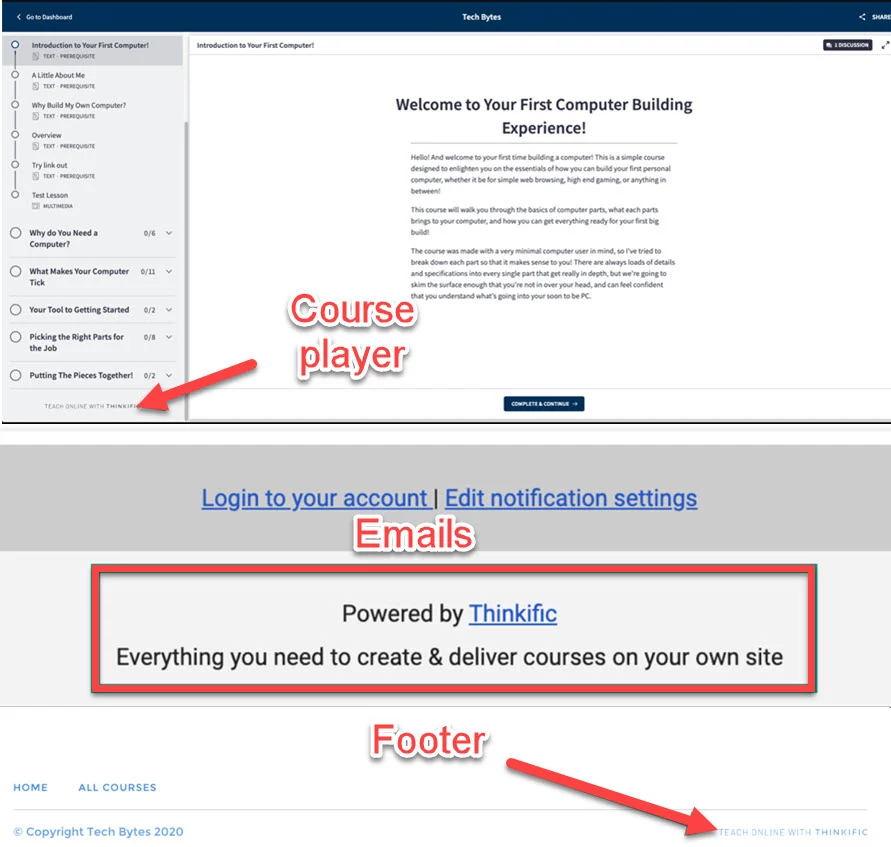
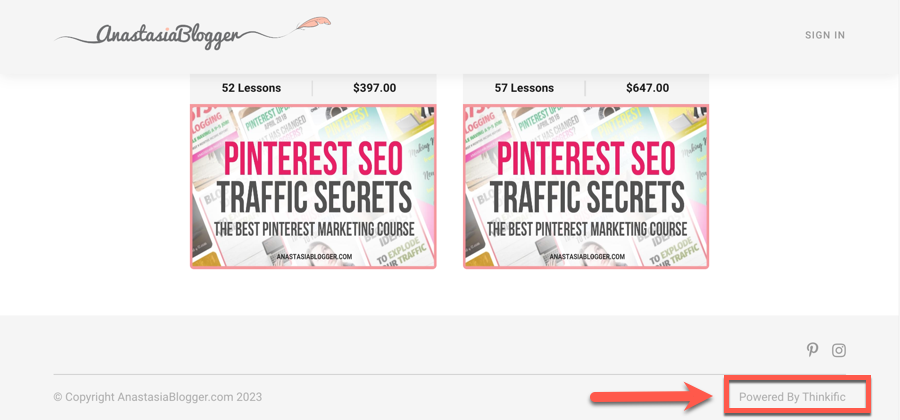
Our advice is to remove the platform’s branding from all these places. That way, you won’t have two brand names on your site, which will ensure brand consistency and improve user experience.
However, it’s not always necessary to completely remove the branding. If this option falls outside your budget, don’t worry too much about it.
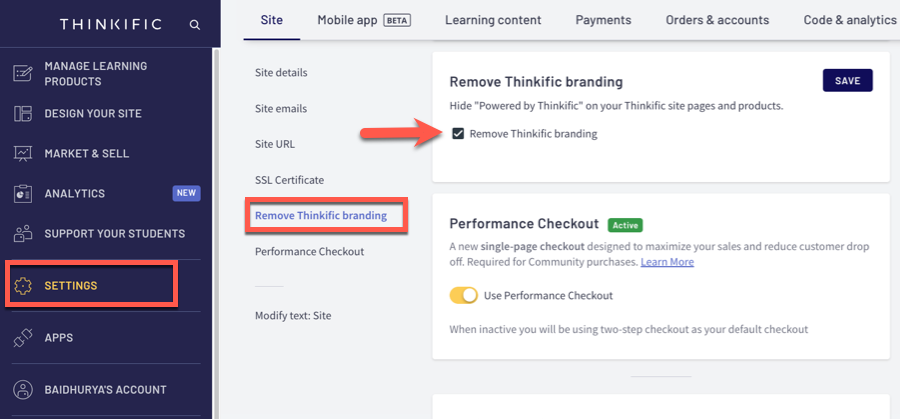
If you decide to remove the branding, you need to go to your account settings and select Remove Thinkific branding. Tick the Remove Thinkific branding box, and click Save.
All student email notifications are sent from a Thinkific subdomain by default. So, when your students receive your emails, they’ll see your website’s name in the sender field.
However, the email address that the emails came from will be Thinkific’s. The email prefix is “notifications” or “no reply,” and the part after the @ sign is “notify.thinkific.com.”
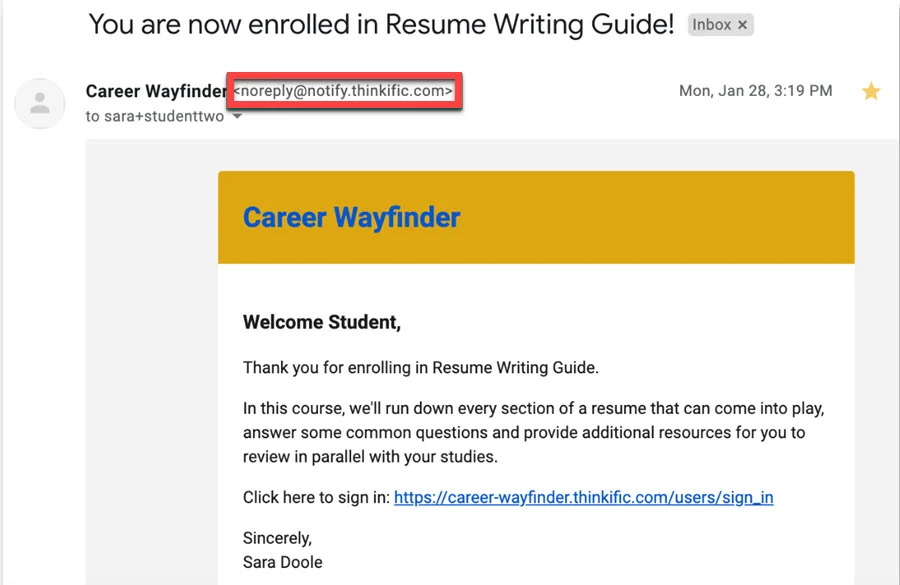
From a visual standpoint, Thinkific’s email address doesn’t affect user experience or your email reaching user inboxes.
Still, for large businesses that want to white-label the platform to the smallest details, sending emails from their servers is an option.
Email white-labeling is available on Thinkific’s higher-tier plans: Expand ($499/month) and Plus. If cost presents an issue, consider deactivating some of the notification emails in Thinkific. You can then set up an integration between Thinkific and your email provider, such as ConvertKit, to send them.
But apart from the cost, you’ll also need technical knowledge to set it up.
To get started, you should first contact the support team and let them know which email you want to use. And the part after @ will have to be a domain different from your site’s URL.
Once you do that, you’ll receive CNAME, TXT, and MX records from Thinkific, which you will need to add to your domain name provider.
You should then contact the support team again to check if you set up all the records correctly.
If everything works as it should, you just need to wait a few more days to let Thinkific make the final configurations before emails start going out from your domain.
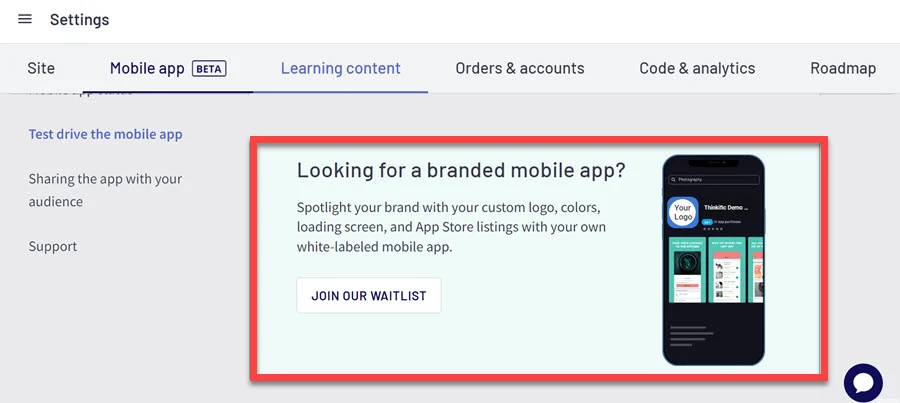
Thinkific has a free mobile app, and it’s an excellent way to boost engagement by allowing your students to watch your courses on their mobile devices. However, the free app belongs to Thinkific, and its branding is visible in the app.
Meanwhile, Thinkific also has the option to get your own app with pretty much the same functionalities. The difference is that a white-label app is yours, and everything inside will align with your brand.
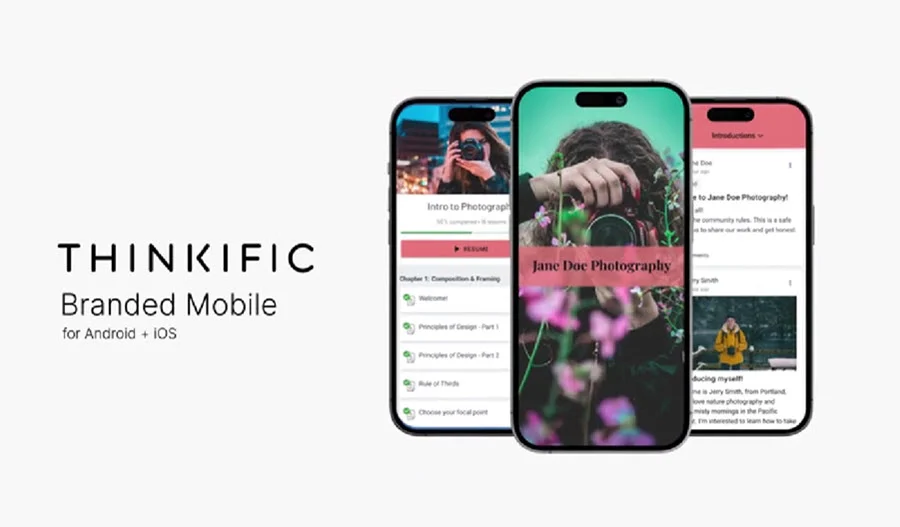
This option is ideal for established brands and creators who want to offer a unified brand experience to their students across different devices.
The process of getting branded apps is straightforward:
Additionally, they’ll maintain your app and provide technical support if and when you need it.
Thinkific made different white-labeling options available on different plans.
| Free | Basic | Start | Grow | Expand | |
|---|---|---|---|---|---|
| Custom domain | ❌ | ✅︎ | ✅︎ | ✅︎ | ✅︎ |
| Website footer | ❌ | ❌ | ❌ | ✅︎ | ✅︎ |
| Course player | ❌ | ❌ | ❌ | ✅︎ | ✅︎ |
| Email footer | ❌ | ❌ | ❌ | ✅︎ | ✅︎ |
| Email white-labeling | ❌ | ❌ | ❌ | ❌ | ✅︎ |
You’ll get most white-labeling options on the Grow plan. You’ll be able to use your own domain and remove the platform’s branding.
And if you want to create your own app, you can add it on top of the Grow plan. The cost of building a custom app with Thinkific isn’t publicly listed.
Thinkific’s white-label options allow you to remove the platform from the picture and make the platform look like it is yours. By putting it under your branding, you raise your brand awareness, add credibility to your business, and create a great user experience.
While we recommend all course creators use their own domain, removing Thinkific’s branding is necessary only if your budget supports it. The email white-labeling option is for established brands, and most creators who sell online courses don’t need it.
If you’d like to subscribe to Thinkific or upgrade your plan to take advantage of white labeling, you can get started by clicking the button below.
Community guidelines are rules and standards that every community member voluntarily agrees to when joining a group. While they’re usually a list of do’s and don’ts, effective community guidelines encourage participation and cooperation between group members.
Any behavior detrimental to the group’s values shouldn’t be allowed in an online community. This commonly includes but isn’t limited to spam, harassment, and prejudicial behavior.
The best way to encourage positive behavior in your community is by being an example yourself. Additionally, you can identify key members of your group and ask them to take the lead in modeling ideal behavior.
A glance through your group should already tell you whether or not the content you’re seeing is in line with your community guidelines. If people are driving the conversation off-topic, you need to address it. Alternatively, you can look at your metrics—specifically your engagement rate. If the engagement is going down, that means that people are losing interest in your group. It’s up to you to figure out why that is and remedy the situation.

Hello, my name is Ana, and I’m a content writer at Sell Courses Online. Specializing in course builders and community platforms, my focus is on helping you find the perfect tools for your business. I thoroughly enjoy exploring and experimenting with tools and software, and I look forward to sharing my findings with you. You can also find me on
SellCoursesOnline is supported by its audience. When you purchase through links on our site, we may earn affiliate commissions. However, this doesn’t influence our reviews or product listings. All opinions are based on our tests and personal experience with a product/service.
Copyright © 2024 by SellCoursesOnline
Hello, my name is Ana, and I’m a content writer at Sell Courses Online. Specializing in course builders and community platforms, my focus is on helping you find the perfect tools for your business. I thoroughly enjoy exploring and experimenting with tools and software, and I look forward to sharing my findings with you. You can also find me on

We respect your privacy and will never spam you.